Two things have to stay visible
The Maptoolkit logo and the copyright line, on every map, at every size and zoom level. That is the whole requirement. This page covers how each renderer produces them and the one MapLibre setting that catches almost everybody.
What has to be on the map
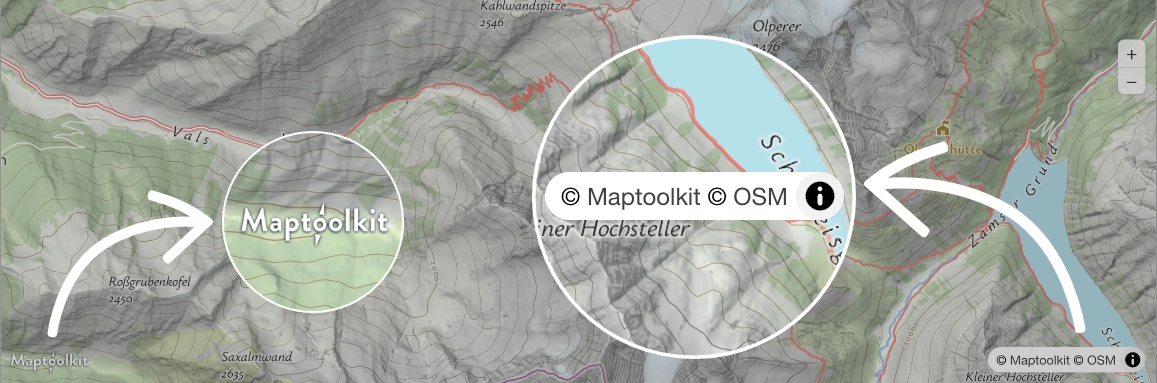
The Maptoolkit logo
At least 24 pixels high on web, 24 points or density-independent pixels on
mobile including retina screens. Place it wherever suits your layout. It
links to https://www.maptoolkit.org/.
The copyright line
© Maptoolkit © Openstreetmap in the bottom-right corner, with
both names as live links: Maptoolkit to
maptoolkit.com/copyright and Openstreetmap to
openstreetmap.org/copyright.
At all times
Neither element may be hidden, obscured, collapsed away or removed, at any screen size, orientation or zoom level. Your own controls and overlays must not cover them.
The copyright line comes out of the service itself: the mtk TileJSON
carries the exact string with both links, so most renderers can show it without
you writing it. The logo is a separate element that you place.
Where the copyright line comes from
MapLibre GL JS
Shown automatically by the built-in attribution control. Do not hand-write it. You do have to configure it, see the caveat below.
Leaflet
Passed as the layer's attribution option, as a string you
write once.
Deck.gl and CesiumJS
These consume raw tiles and show nothing automatically. Use the overlay snippet below, which provides both parts.
OpenLayers and kepler.gl
These render from the style and may surface the line through their own attribution control. Drop the overlay's copyright span only where you have confirmed the line is permanently visible. kepler.gl collapses its line, so there keep both parts.
The MapLibre caveat. The attributionControl option
defaults to { compact: true }, and with compact truthy
the control is in compact mode at every viewport width. It renders
expanded, then collapses to a small information button the first time someone
drags the map. Since the line has to stay visible at all times, pass
attributionControl: { compact: false } when you construct the map.
That is the only reliable fix.
const map = new maplibregl.Map({
  container: 'map',
  style: 'https://styles.maptoolkit.org/summer.json',
  attributionControl: { compact: false }
});
Do not try to reopen it from JavaScript. In compact mode the text is shown and
hidden by a CSS class rather than by the open attribute, so setting
open has no effect and the next drag re-collapses it. If a wrapper
library owns the MapLibre instance and does not expose
attributionControl, render the copyright span from the overlay
instead.
Let a package place it for you
Two drop-in packages handle the logo and its positioning, so you are not fighting your own layout. Both are MIT licensed and the source is public.
Everything else
The overlay below is self-contained and has no dependencies. Put it inside
the map container, which needs position: relative.
<style>
  .mtk-logo{position:absolute;left:8px;bottom:8px;z-index:1000}
  .mtk-logo img{height:24px;display:block}
  .mtk-copy{position:absolute;right:0;bottom:0;z-index:1000;
    background:rgba(255,255,255,.7);padding:0 5px;font:12px/1.5 sans-serif}
  .mtk-copy a{color:#000;text-decoration:none}
</style>
<a class="mtk-logo" href="https://www.maptoolkit.org/" target="_blank" rel="noopener">
  <img src="https://www.maptoolkit.org/assets/maptoolkit-attribution.png" alt="Maptoolkit">
</a>
<span class="mtk-copy">
  <a href="https://www.maptoolkit.com/copyright/" target="_blank" rel="noopener">© Maptoolkit</a>
  <a href="https://www.openstreetmap.org/copyright" target="_blank" rel="noopener">© Openstreetmap</a>
</span>Frequently asked questions
Why is the copyright line disappearing when I drag the map?
MapLibre's attribution control defaults to compact mode, which collapses
the line the first time the map is dragged. Construct the map with
attributionControl: { compact: false }. Forcing the details
element open from JavaScript does not work: compact mode shows and hides
the text with a CSS class, not the open attribute, and the
next drag collapses it again.
Can I make the logo smaller or move it?
Move it anywhere on the map. It has to stay at least 24 pixels high on web, or 24 points or density-independent pixels on mobile including retina, and stay fully visible and unobstructed at every size, orientation and zoom level.
Do I need both the logo and the copyright line?
Both, on every map. The copyright line comes out of the service because the TileJSON carries it. The logo is a separate element you place, either with one of the plugins or with the overlay.
My renderer already shows a copyright line. Do I add another?
One is enough, as long as it is permanently visible and never collapses. Keep the logo and drop the duplicate span. A line that hides behind an information button does not count as shown, so keep both parts in that case. kepler.gl collapses its line, which is the usual example.
Why is attribution required at all?
OpenStreetMap's licence requires crediting the data, and the Maptoolkit logo is how the free service pays for itself. People who see it and then need an SLA, a private deployment or the APIs end up on maptoolkit.com, and that revenue funds the community tiles. Keeping the logo visible is the condition the tiles are free under.